
Dieser Inhalt ist noch nicht in deiner Sprache verfügbar.
VERFÜGBARKEIT
Berechtigung: ✓ Auslöseverlauf anzeigen
Plattform: ✓ Web ✓ Mobil
How to View Meter Trigger History
Section titled “How to View Meter Trigger History”The History tab on a meter trigger record shows the reading events that matched the trigger logic. Use it to verify that the trigger is firing at the expected values and times.
Step 1: Open Meter Triggers list
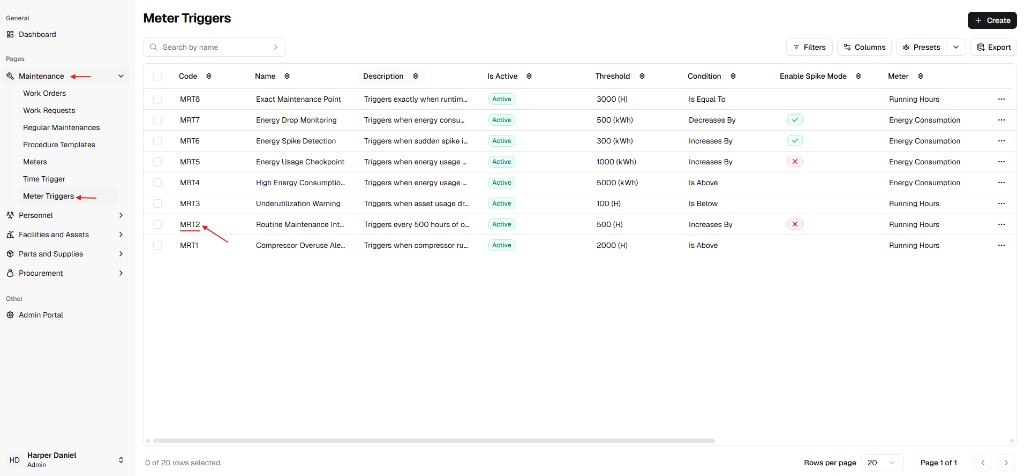
Section titled “Step 1: Open Meter Triggers list”From the main sidebar, go to Maintenance and select Meter Triggers.
Find the trigger you want to inspect (for example by Code or Name) and open its record from the list.
Step 2: Open the History tab
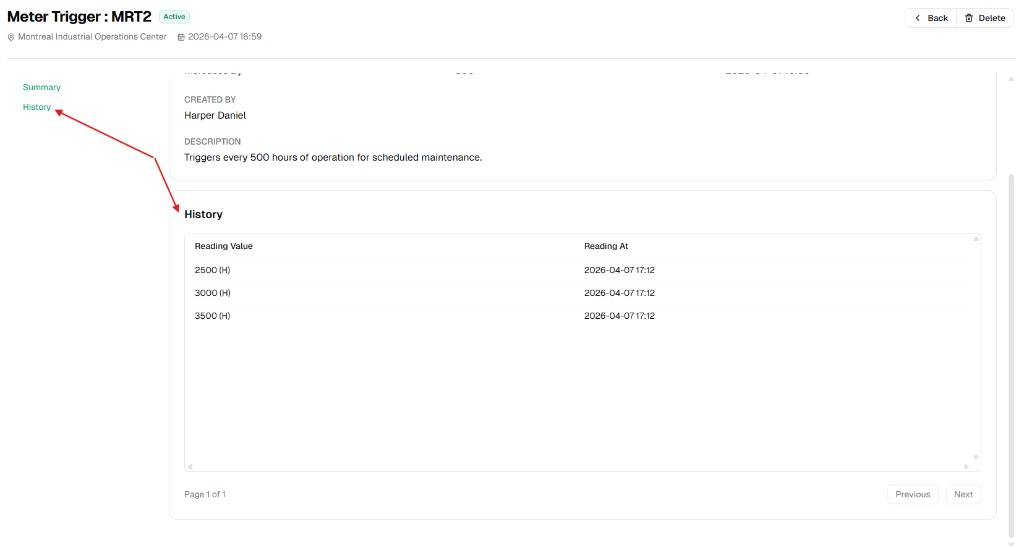
Section titled “Step 2: Open the History tab”Inside the meter trigger detail page, use the left panel and click History.
The history table lists each matched reading event with:
- Reading Value: the meter value that triggered the rule.
- Reading At: the timestamp when that reading was recorded.
How to use this history
Section titled “How to use this history”| Use case | What to check |
|---|---|
| Validate trigger behavior | Confirm values in Reading Value match the trigger condition and threshold. |
| Troubleshooting | If automation did not run as expected, compare recent readings and timestamps here. |
| Audit trail | Keep evidence of when meter-based trigger events occurred. |
Note: History is tied to the current meter trigger record only. Duplicating a trigger creates a new record with its own future history.